



When you manage hosting for multiple clients, a backup is not just another hosting feature. It is part of the safety net behind every website you host.
A website can go offline because of a server failure, accidental deletion, software problems, database corruption, a compromised account, or a failed update. Without a reliable recovery plan, even a small issue can turn into hours of technical work and potential data loss.
This is why reseller hosting backup and disaster recovery should be planned before something goes wrong.
A backup gives you a usable copy of important data. Disaster recovery gives you a practical process for restoring that data and getting the affected website or service back online.
In this guide, you will learn what to back up, how often to create backups, how RPO and RTO work, why off-site storage matters, how to test your backups, and how to create a practical disaster recovery plan for your reseller hosting business.
What Is Reseller Hosting Backup?
Reseller hosting backup means creating copies of the data and configurations associated with the websites you host.
Depending on your hosting environment and backup system, this may include:
- Website files
- Databases
- Email accounts
- DNS configuration
- Hosting account settings
- Cron jobs
- SSL-related configuration
- Application settings
- Other account-level data
However, the exact backup scope depends on the provider and the backup system being used.
For example, a backup may include website files and databases but have different rules for email accounts or DNS settings. Therefore, you should always confirm what your hosting plan actually backs up and how restoration works.
What Is Disaster Recovery?
Backup and disaster recovery are closely connected, but they are not the same thing.
A backup answers:
“Do we have a copy of the data?”
Disaster recovery answers:
“What will we do if the original system becomes unavailable?”
For example, having a database backup is useful. However, you also need to know:
- Where the backup is stored
- Which restore point should be used
- Who can access it
- How the website will be restored
- How long restoration should take
- How the restored website will be tested
- What happens if the first backup is damaged
This is particularly important for resellers because you may be responsible for several client websites at the same time.
Why Backups Matter in Reseller Hosting
A problem with one website is inconvenient. A hosting issue affecting several client accounts can become much more serious.
Consider a reseller managing:
- A restaurant website
- An online store
- A business website
- A booking website
- A membership website
Each website has different data and recovery requirements.
An ecommerce website may receive new orders throughout the day. A business website may only change occasionally. A booking website may continuously receive new appointments.
If the latest usable backup is several days old, restoring it could mean losing important information created after that backup.
Reliable backups can help you recover from:
- Accidental file deletion
- Failed updates
- Database corruption
- Plugin or theme issues
- Malware incidents
- Ransomware
- Human error
- Failed migrations
- Configuration mistakes
- Server-related problems
However, backups should not replace good security practices. They are one part of a wider hosting security and recovery strategy.
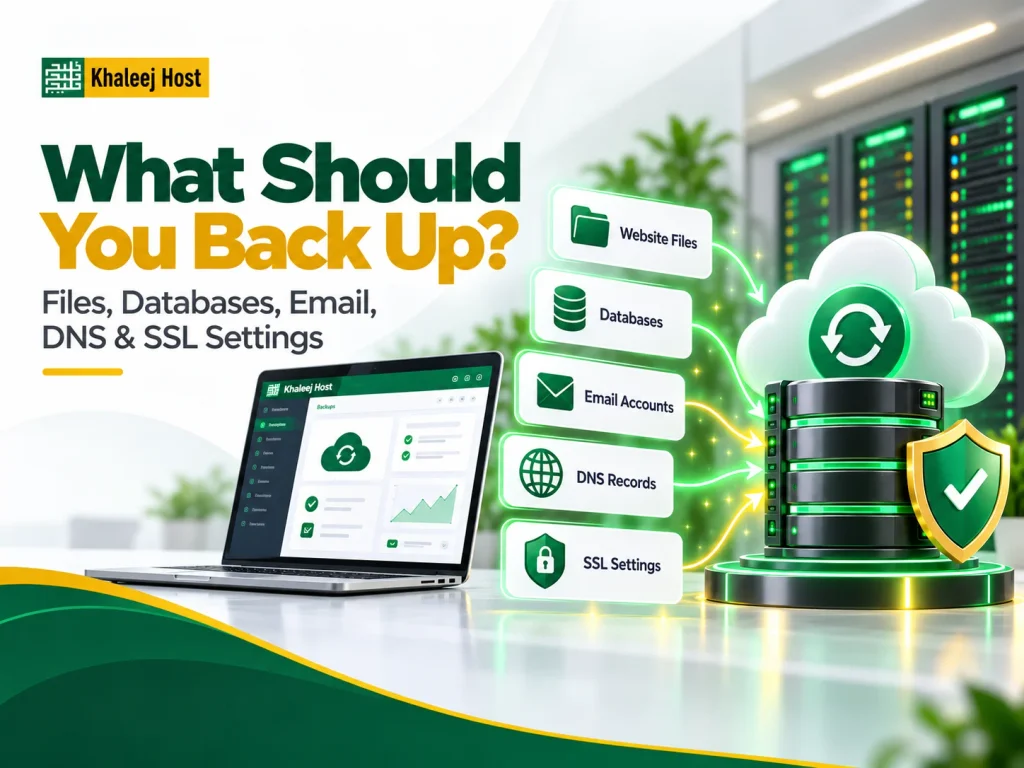
What Should You Back Up?
A good backup strategy starts by identifying what each client actually needs to recover.
Website Files
Website files include the code, images, themes, plugins, configuration files, and other resources required to run the website.
For a WordPress website, this can include:
- WordPress core files
- Themes
- Plugins
- Uploads
- Configuration files
- Custom code
If these files are missing, restoring only the database may not bring the website back properly.
Databases
Databases often contain the information that changes most frequently.
Depending on the website, this may include:
- Orders
- Customer accounts
- Form submissions
- Blog content
- Product information
- Booking records
- Membership information
- Website settings
For ecommerce and booking websites, database backups are especially important because new information may be added throughout the day.
Email Accounts
Business email should not be overlooked.
If your clients use hosting-based email, their mailboxes may contain important business communication, order notifications, customer conversations, and other records.
If email is part of your hosting service, confirm whether your backup solution includes:
- Email accounts
- Messages
- Mailbox configuration
- Forwarders
- Email-related settings
Do not assume email is automatically covered just because website files are backed up.
DNS and Hosting Configuration
DNS and hosting configuration can also become important during recovery.
Keep track of settings such as:
- DNS records
- Subdomains
- Redirects
- Cron jobs
- PHP settings
- Application configuration
- Account-level settings
Having this information documented can make recovery faster and reduce unnecessary troubleshooting.
SSL and Application Settings
SSL certificates, API settings, environment files, application configurations, and other technical details may also be required to bring a website back to normal operation.
Not every item needs to be backed up in exactly the same way. The important part is understanding what your recovery process depends on.
How Often Should You Back Up Client Websites?
There is no single backup schedule that works for every website.
Instead, consider how frequently the website changes and how much recent data the client can afford to lose.
For example:
Static website: Less frequent backups may be sufficient when changes are rare.
Business website: Regular backups can protect recently updated pages, forms, and other content.
Ecommerce website: More frequent backups may be required because orders, customers, products, and other data can change continuously.
Booking or membership website: Frequent backups can be important when new bookings, registrations, or transactions are created throughout the day.
The right schedule should be based on the client’s recovery requirements rather than simply choosing the same frequency for every account.
What Is RPO in Disaster Recovery?
RPO stands for Recovery Point Objective.
It describes how much recent data loss can be acceptable after an incident.
For example, imagine an ecommerce client says:
“We cannot afford to lose more than one hour of orders.”
Their backup and recovery strategy needs to provide a recovery point that supports this requirement.
Another client may operate a simple company website where losing a day’s content changes would have a much smaller impact.
RPO therefore helps you decide how frequently important data needs to be captured.
In simple terms:
RPO = How much recent data can you afford to lose?
What Is RTO in Disaster Recovery?
RTO stands for Recovery Time Objective.
It describes how quickly a service should be restored after a disruption.
For example:
- A simple business website may tolerate a longer recovery period.
- An ecommerce store may require faster restoration.
- A booking platform may need priority recovery because customers depend on it.
RTO helps you set realistic recovery expectations.
In simple terms:
RTO = How long can the service remain unavailable?
RPO and RTO should be considered together when planning disaster recovery for client websites.
Should Reseller Hosting Backups Be Stored Off-Site?
Ideally, you should not keep every backup in exactly the same environment as the original website.
Imagine a server failure affects both your client websites and the backup storage connected to that server. Your backup may then become unavailable when you need it most.
The same concern applies to ransomware and other security incidents. If an attacker gains access to the primary environment and connected backup storage, multiple recovery points could be at risk.
For this reason, important backups should have appropriate separation from production systems.
When evaluating a reseller hosting provider, ask:
- Where are backups stored?
- Are backups stored separately from the production server?
- Are backups encrypted?
- How long are they retained?
- Can individual accounts be restored?
- Can specific files or databases be restored?
- What happens if the main server becomes unavailable?
These questions are more useful than simply asking whether a hosting provider “offers backups.”
Follow the 3-2-1 Backup Principle
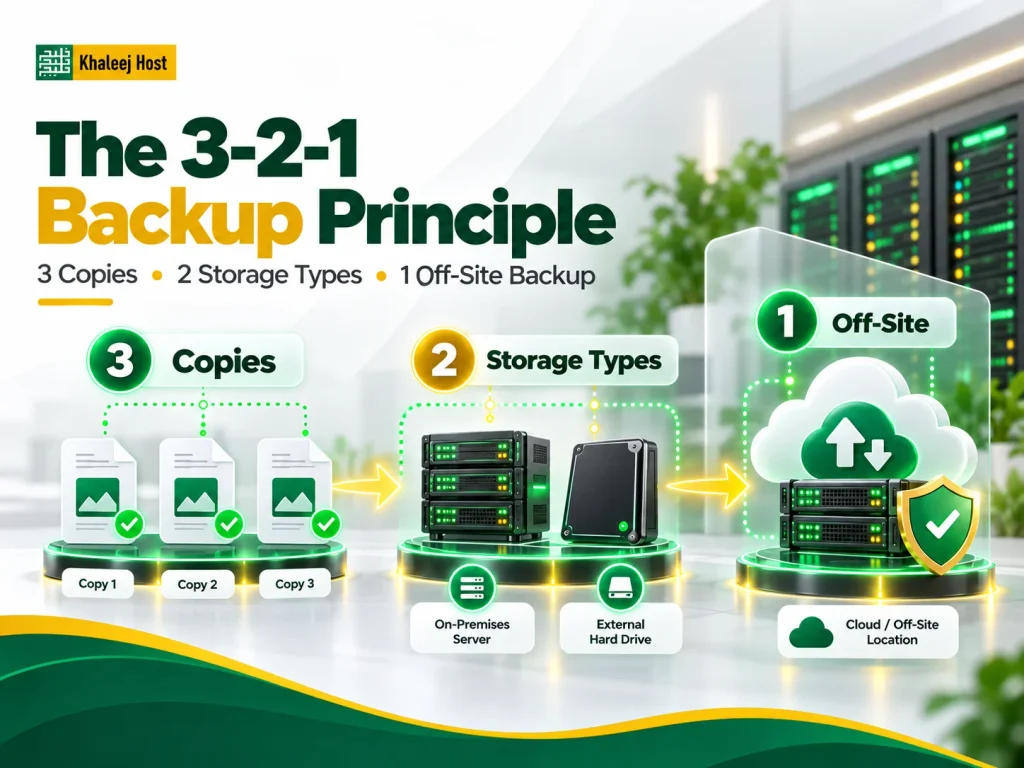
The 3-2-1 backup approach is a widely used framework for improving backup resilience.
It generally means:
- Keep at least 3 copies of important data
- Use at least 2 different storage types or locations
- Keep at least 1 copy off-site
You do not have to treat this as a universal requirement for every website.
Instead, use it as a practical way to reduce the risk of one incident affecting every available copy.
For high-value websites, additional protection such as isolated or offline backups can provide another layer of resilience.
Automated vs Manual Backups
Automated backups should normally be the foundation of your strategy.
Manual backups depend on someone remembering to create them. As your client base grows, this becomes difficult to manage consistently.
Automated backups provide a repeatable schedule.
However, manual backups can still be useful before major changes such as:
- WordPress updates
- Theme changes
- Plugin installations
- Database changes
- Website migrations
- Major redesigns
- Server configuration changes
A practical approach is to use automated scheduled backups and create an additional backup before high-risk changes.
How Long Should You Keep Backups?
Backup retention determines how far back you can go when something goes wrong.
Keeping only the newest backup can create problems when an issue is discovered several days after it started.
For example, malware may be introduced on Monday but discovered on Friday. If you only have the latest backup, your recent recovery points may already contain the compromised files.
A practical retention strategy can include:
- Recent backups for quick recovery
- Weekly recovery points for longer coverage
- Monthly backups for selected important websites
The exact retention period should depend on:
- Website importance
- Data change frequency
- Storage capacity
- Client requirements
- Recovery objectives
- Business or regulatory requirements
The goal is to maintain enough historical recovery points without keeping unnecessary backups indefinitely.
Test Your Backups With Real Restores
A successful backup job does not automatically mean you have a successful recovery system.
You need to test restoration.
A restore test can identify problems such as:
- Incomplete backups
- Corrupted files
- Missing databases
- Incorrect permissions
- Broken configurations
- Missing dependencies
- Unexpected restore limitations
- Longer-than-expected recovery times
Test restores in a controlled environment whenever possible.
After restoring, check:
- Does the website load?
- Does the database work?
- Do forms function?
- Do images load?
- Does the admin panel work?
- Are important plugins functioning?
- Are SSL and redirects working?
- Are emails configured correctly?
- Does the website behave normally?
Also record how long the restoration takes. This gives you practical information for your RTO planning.
How to Protect Backups From Ransomware
A backup that is permanently connected and accessible through the same compromised credentials may not provide enough protection.
Attackers can target accessible backups after compromising the primary environment.
To improve backup protection, consider:
- Offline or isolated copies
- Separate backup credentials
- Strong authentication
- Encryption
- Limited administrative access
- Backup monitoring
- Multiple recovery points
- Regular restore testing
Your backup system should also have access controls that prevent unnecessary users from deleting or modifying recovery data.
What If a Backup Is Already Compromised?
Never assume the newest backup is automatically the cleanest backup.
If a website has been hacked, first determine when the compromise may have occurred.
For example, if malware was introduced five days ago, restoring yesterday’s backup could simply restore the malware.
Before restoration:
- Identify the suspected incident timeline.
- Review available backup points.
- Select a potentially clean recovery point.
- Scan and inspect the backup where appropriate.
- Restore in a controlled environment when possible.
- Update vulnerable software.
- Change compromised credentials.
- Review access permissions.
- Monitor the restored website.
The recovery process should address the cause of the incident, not just the visible symptoms.
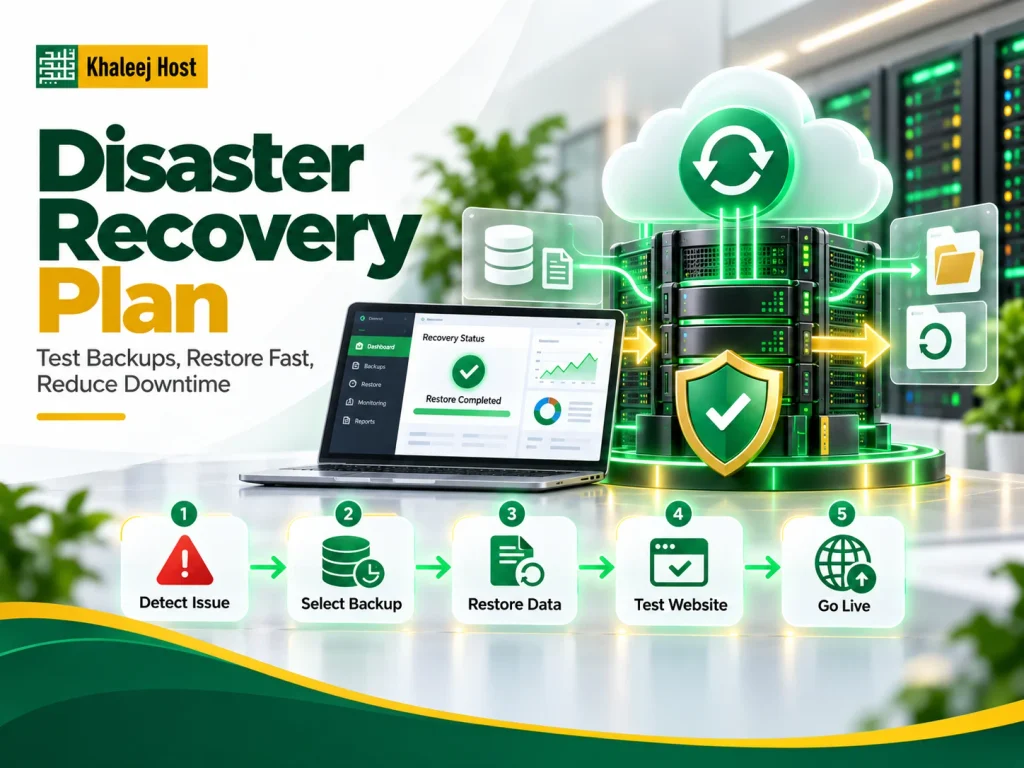
Build a Disaster Recovery Plan for Your Reseller Business
A disaster recovery plan does not need to be complicated.
It needs to answer the important questions before an incident happens.
Identify Critical Services
Make a list of the websites and services you manage.
Then identify which clients depend on:
- Ecommerce
- Online bookings
- Customer databases
- Membership systems
- Business-critical applications
Define Responsibilities
Decide who handles:
- Initial investigation
- Backup selection
- Restoration
- Security checks
- DNS changes
- Client communication
- Final verification
This avoids confusion when multiple people are involved.
Set Recovery Priorities
Not every website needs to be restored in exactly the same order.
Create practical recovery priorities based on business impact and agreed client requirements.
Keep Emergency Access Information Secure
Authorized team members should know where important recovery information is stored.
This may include:
- Hosting access
- Backup access
- Domain access
- DNS access
- Provider support information
- Client emergency contacts
Do not keep sensitive credentials in an unsecured document or public communication channel.
Document the Restore Process
Write down the actual recovery steps.
A simple recovery document might include:
- Identify the affected account.
- Confirm the cause.
- Select the appropriate restore point.
- Prepare the destination environment.
- Restore files and databases.
- Restore required configuration.
- Test the website.
- Apply security fixes.
- Update DNS if required.
- Monitor the website.
Test the Plan
A disaster recovery plan that exists only in a document may not work smoothly under pressure.
Run recovery exercises periodically so your team understands the process.
Disaster Recovery for Different Website Types
Static Business Websites
Static websites are generally simpler to recover because they may contain fewer moving parts.
A backup of website files, configuration, and relevant DNS information may cover most recovery requirements.
WordPress Websites
WordPress websites normally require both files and database data.
You should also consider:
- Plugins
- Themes
- Uploads
- Configuration files
- Custom code
- PHP compatibility
- SSL
- DNS
Backing up only the database is not enough to guarantee a complete WordPress restoration.
Ecommerce Websites
Ecommerce websites require additional attention because orders, customers, products, inventory, and other information can change frequently.
For these websites, recovery should focus on minimizing both downtime and recent data loss.
Booking and Membership Websites
Booking and membership systems can continuously create new records.
Your recovery plan should consider how appointments, user accounts, payments, and other dynamic information will be restored.
What to Do When a Client Website Goes Down
When a client reports that their website is unavailable, do not immediately restore the latest backup.
First identify the cause.
A practical process is:
1. Confirm the outage
Check whether the entire website is down or only a specific feature.
2. Identify the scope
Determine whether the problem affects one account or multiple websites.
3. Investigate the cause
Check for server problems, DNS issues, application errors, expired services, security incidents, or recent changes.
4. Protect the current state
If there may be a security incident, avoid destroying useful evidence before understanding what happened.
5. Select a recovery point
Choose a backup based on the incident timeline and client requirements.
6. Restore
Restore the necessary files, databases, and configurations.
7. Test
Check the website, forms, login systems, checkout, emails, and other important functions.
8. Fix the underlying problem
If a plugin vulnerability caused the incident, restoring the website without fixing the vulnerability can lead to another compromise.
9. Monitor
Watch the website after recovery.
10. Document
Record what happened, what your team restored, and what changes could help prevent the issue from happening again.
Common Reseller Hosting Backup Mistakes
Even businesses with backup systems can make recovery difficult through poor planning.
Assuming the Provider Backup Covers Everything
Always confirm the exact backup scope.
Keeping Every Backup on the Same Server
A server-level incident can affect both the website and its backup.
Never Testing Restoration
A backup you cannot restore reliably is not a complete recovery solution.
Backing Up Files but Ignoring Databases
Dynamic websites often depend heavily on database data.
Ignoring Email
If email is part of your hosting service, include it in your recovery planning.
Keeping Only One Recent Backup
A single recovery point may not help if the problem existed before it was discovered.
Using Shared Administrative Credentials
Compromised credentials can put multiple client accounts and backups at risk.
Restoring an Infected Backup
Always consider when the compromise occurred before selecting a restore point.
Having No Documented Recovery Process
Technical knowledge that exists with only one team member creates a business continuity risk.
Forgetting Client Communication
Technical recovery is only one part of disaster response. Clients also need clear information about what happened and what is being done.
Reseller Hosting Backup Checklist
Before relying on your backup strategy, check the following:
- Backup scope is clearly defined
- Website files are included
- Databases are included
- Email requirements are addressed
- Automated backups are enabled
- Multiple recovery points are retained
- Important backups are stored separately where appropriate
- Backup access is properly secured
- Backup credentials are protected
- Restore testing is performed
- RPO is defined for important clients
- RTO is defined where necessary
- Emergency contacts are documented
- Recovery procedures are written down
- Security incidents have a recovery process
- Client communication procedures are documented
How Backup Strategy Fits Into Reseller Hosting Security
Backups are an important part of security, but they do not prevent every incident.
Your wider strategy should also include strong passwords, access control, software updates, malware monitoring, SSL, secure account management, and regular security checks.
For a broader security framework, see Reseller Hosting Security: How to Protect Your Clients’ Websites.
The two strategies work together:
Security reduces the risk of an incident.
Backups and disaster recovery reduce the impact when something goes wrong.
How Backups Help With Website Migration
Backups are also useful when moving websites between hosting environments.
Before a migration, having a reliable backup gives you a recovery option if something goes wrong with files, databases, configuration, or DNS.
If you are planning a move, see How to Migrate Websites to Reseller Hosting Without Downtime for a practical migration process.
A migration backup should not replace your normal disaster recovery strategy. Keep regular backups active after the migration is complete.
Backup and Recovery When Using WHMCS
If you use WHMCS for billing and client management, remember that WHMCS itself contains important business information.
Depending on your setup, this may include:
- Client records
- Billing information
- Service details
- Invoices
- Configuration
- Support information
- WHMCS database data
WHMCS is a billing and client management platform. It should not be treated as a replacement for a dedicated backup strategy.
If you use WHMCS in your reseller business, see Reseller Hosting with WHMCS: Billing and Client Management Explained for more information.
Managed vs Unmanaged Reseller Hosting and Backup Responsibility
Backup responsibilities can differ depending on whether your hosting environment is managed or unmanaged.
With managed hosting, the provider may handle more server-level tasks. However, you should still confirm exactly what is included rather than assuming that all recovery responsibilities are covered.
With unmanaged hosting, you may have more responsibility for configuration, monitoring, backups, and recovery.
Before choosing either model, ask:
- Who creates the backups?
- Who stores them?
- Who monitors them?
- Who performs restoration?
- Is restoration included?
- Is there an additional recovery fee?
- How long are backups retained?
- What happens during a major infrastructure failure?
You can also read Managed vs Unmanaged Reseller Hosting: Which Model Fits Your Business? before choosing a hosting model.
Is Reseller Hosting Backup Included With Your Plan?
Backup inclusion varies between hosting providers and plans.
Even when a provider advertises backups, check the actual terms.
Ask about:
- Backup frequency
- Retention period
- Backup storage location
- File and database coverage
- Email coverage
- Individual account restoration
- Full account restoration
- Restore fees
- Off-site or isolated storage
- Recovery support
- Backup testing
Do not compare reseller hosting plans only by storage, bandwidth, or monthly price.
For a reseller, recovery capability can become just as important as the resources included in the hosting package.
How to Choose a Reseller Hosting Provider With Backup in Mind
Backup should be one of the factors you evaluate when comparing providers.
Look beyond a simple “daily backup” statement and find out what that actually means.
A useful provider checklist includes:
- What exactly is backed up?
- How frequently are backups created?
- How many recovery points are retained?
- Where are backups stored?
- Are backups isolated from the production environment?
- Can individual accounts be restored?
- Can individual files or databases be restored?
- Is restoration included?
- Is there a restore fee?
- How quickly can support assist during a recovery?
- Can you upgrade resources as your client base grows?
For a wider comparison framework, read How to Choose a Reseller Hosting Provider in UAE.
Why Backup Planning Matters for Resellers in the UAE
For agencies, freelancers, developers, and hosting resellers in the UAE, reliability is part of the service you provide to clients.
Your clients may not understand the technical details of backups, RPO, or disaster recovery. They simply expect their websites and business data to remain available and recoverable when something goes wrong.
That makes your hosting infrastructure and recovery process part of your overall client service.
When comparing providers, evaluate backup and recovery alongside performance, resources, support, WHM/cPanel access, scalability, and pricing.
Why Consider KhaleejHost for Reseller Hosting?
When choosing reseller hosting, focus on the features and support that match your business requirements.
KhaleejHost provides hosting solutions for businesses and resellers. Before selecting any hosting plan, review the exact backup frequency, retention, storage, restoration process, and support included with that plan.
This approach helps you compare hosting providers based on actual recovery capabilities rather than marketing terms alone.
Frequently Asked Questions
How often should reseller hosting backups be taken?
It depends on how frequently the website changes and how much recent data the client can afford to lose. Static websites may need less frequent backups, while ecommerce, booking, and membership websites may require more frequent protection.
Are reseller hosting backups enough for disaster recovery?
Not by themselves. A backup is only one part of disaster recovery. You also need a documented restoration process, access to backups, recovery priorities, testing, and defined RPO and RTO where appropriate.
What should be included in a reseller hosting backup?
Your backup strategy should consider website files, databases, email, hosting configuration, DNS information, and application-specific data. Exact coverage depends on the hosting environment.
Should reseller hosting backups be stored off-site?
Ideally, important backups should have separation from the production environment. Separate or isolated copies can reduce the risk of losing both the original data and backups during a major infrastructure or security incident.
What is RPO in disaster recovery?
RPO stands for Recovery Point Objective. It defines how much recent data loss can be acceptable after an incident.
What is RTO in disaster recovery?
RTO stands for Recovery Time Objective. It defines the target time for restoring a service after a disruption.
How often should reseller hosting backups be tested?
Backups should be tested regularly rather than simply assumed to be usable. The testing frequency should depend on how important the website or service is and how much risk your business can accept.
What should I do if a client website is hacked?
Do not immediately restore the newest backup. First investigate when the compromise may have occurred, identify a potentially clean recovery point, restore in a controlled way where possible, update vulnerable software, change compromised credentials, and monitor the website after recovery.
Conclusion
Reseller hosting backup and disaster recovery should be treated as part of your core hosting operations, not as an optional extra.
A reliable strategy starts with understanding what needs to be protected. From there, you can define backup frequency, retention, RPO, RTO, storage separation, access controls, and restore procedures.
Most importantly, test your backups.
A backup that appears successful in a hosting dashboard is not enough. You need confidence that your files, databases, configurations, and other critical data can actually be restored when a client needs them.
For resellers managing multiple websites, preparation can make the difference between a controlled recovery and a much larger business disruption.